

Less time on stems.
More time for music.
StemWrapper turns a folder of individual tracks exported from your DAW into a complete stem delivery: stems summed, level adjusted, and files named to match your publisher's requirements. Then it recombines the stems and checks that they match the mix.
Standalone application · Windows · macOS
StemWrapper
Secure checkout by FastSpring. Your licence arrives by email straight away.
By buying you ask for immediate access and waive your right of withdrawal. Terms
How it works
Five steps. You make the decisions; StemWrapper handles the repetitive work.
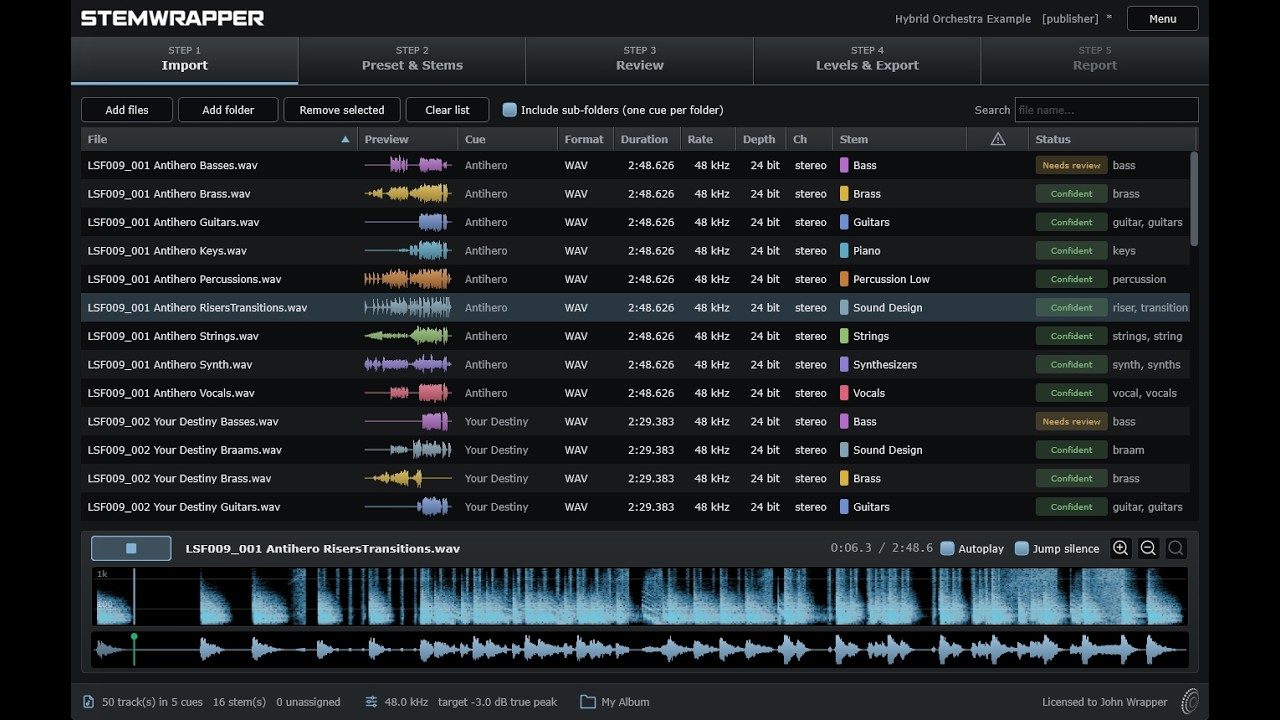
- Import Point it at the folder exported by your DAW. Subfolders become cues.
- Preset & stems Define the stem list once. Keywords are optional and can help place tracks automatically.
- Review See where each track landed, audition any track or stem, and move anything that needs adjusting.
- Levels & export Set the target level, choose the formats, preview the file names, and export.
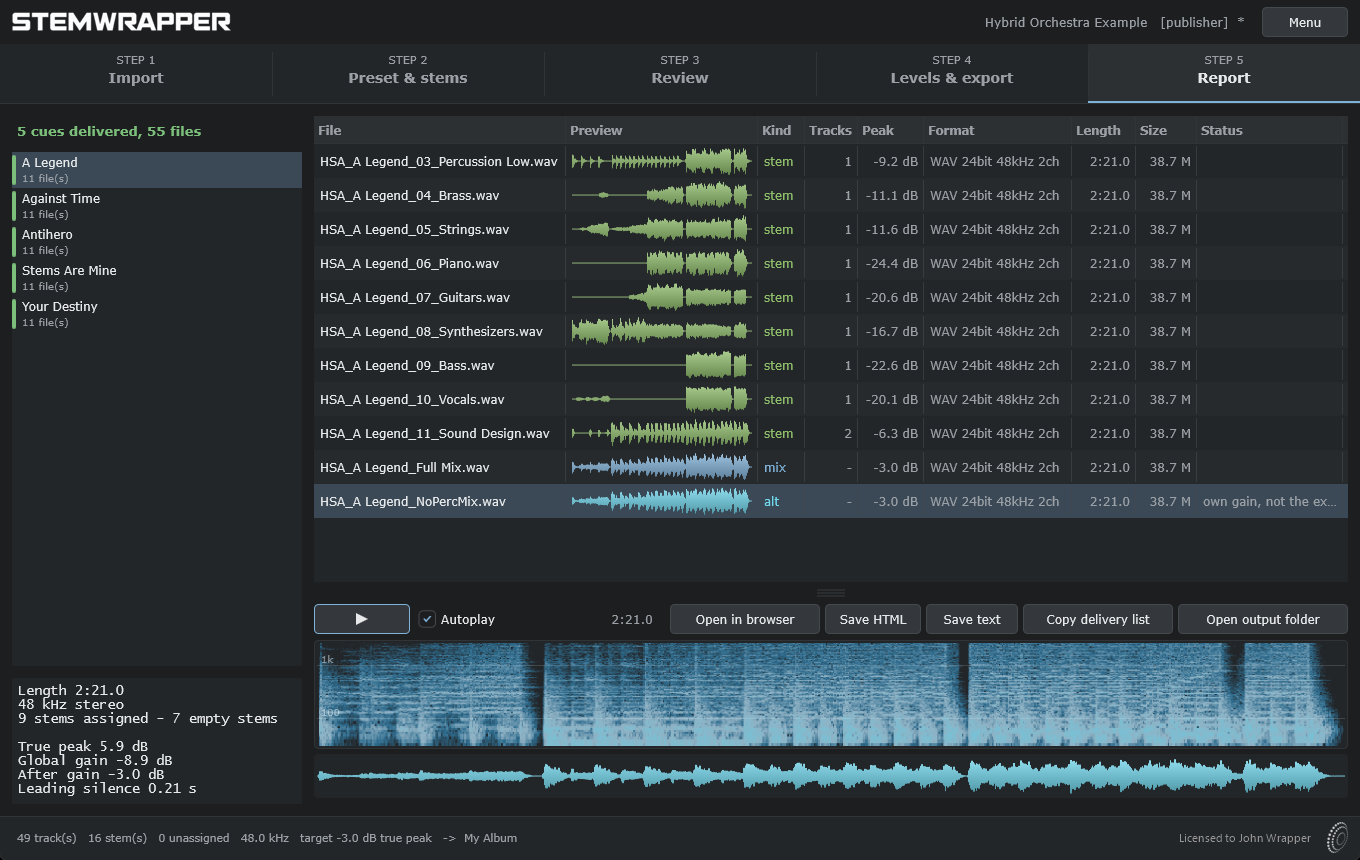
- Report Review every exported file, including its level and waveform, and audition it in the built-in player.
Stem deliveries simplified
Once a cue is approved, the delivery still has to be prepared: stems need to be arranged and named to the specification you were given, and brought to the required level. Doing that by hand is repetitive and time-consuming, and small mistakes can be easy to make and hard to spot. StemWrapper handles that part for you.
It sorts your tracks
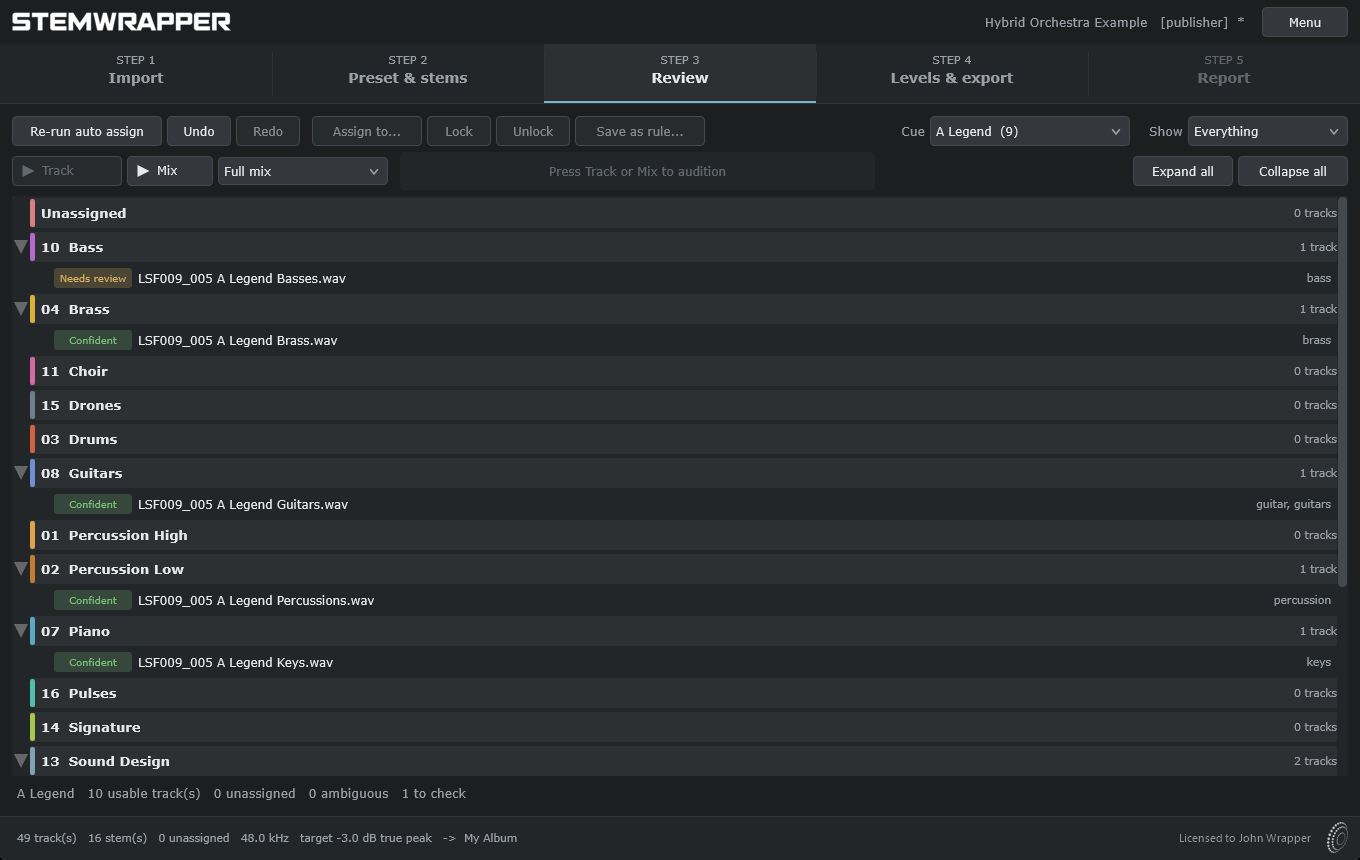
Tracks are matched to the stem list you defined by name, not by guesswork.
Point it at the folder exported by your DAW and StemWrapper matches each track to the stem list you defined. Confident matches are assigned automatically; anything uncertain is clearly flagged and gathered at the top of the list for review.
Keywords can help, but they are not required. You can assign any track manually at any time, and build an entire delivery without entering a single keyword.
Your session does not need to be tidy. Tracks can arrive in neatly organised instrumental groups, in groups that need to be rearranged to match the delivery specification, or with no grouping at all: sound design, free-form arrangements, or a hundred tracks that evolved with the piece. The matching works the same way in every case.
It sets the level and names the files
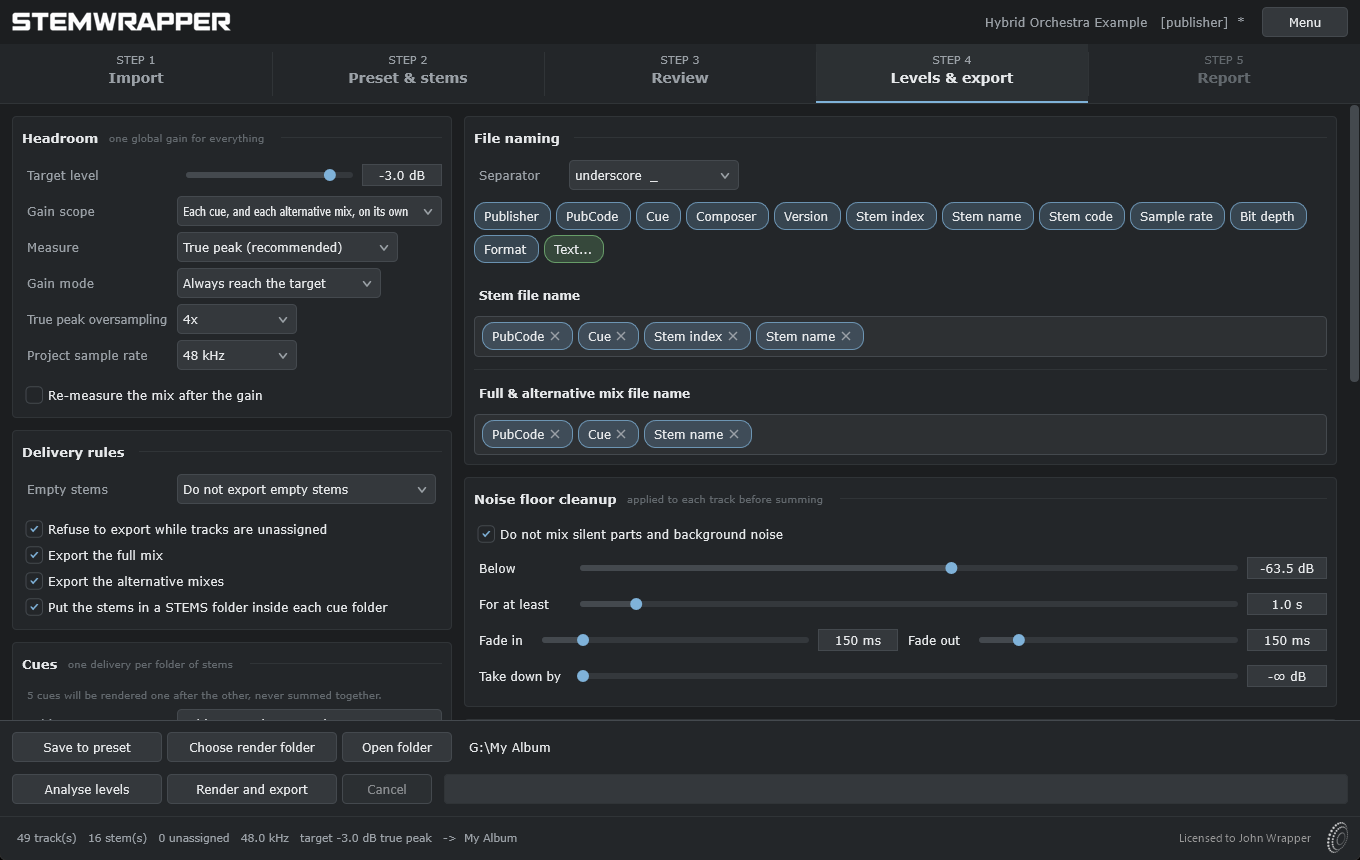
One gain adjustment across the delivery, plus a naming convention you set up once.
StemWrapper measures true peak and applies one gain adjustment across the set, preserving the balance between stems. Alternative mixes can reach the target independently if you prefer. File names are built from the elements your publisher requires - code, cue, index, stem name - and previewed as you set the convention. Save the preset, and the next job using the same specification is ready in one click.
It keeps background noise from building up
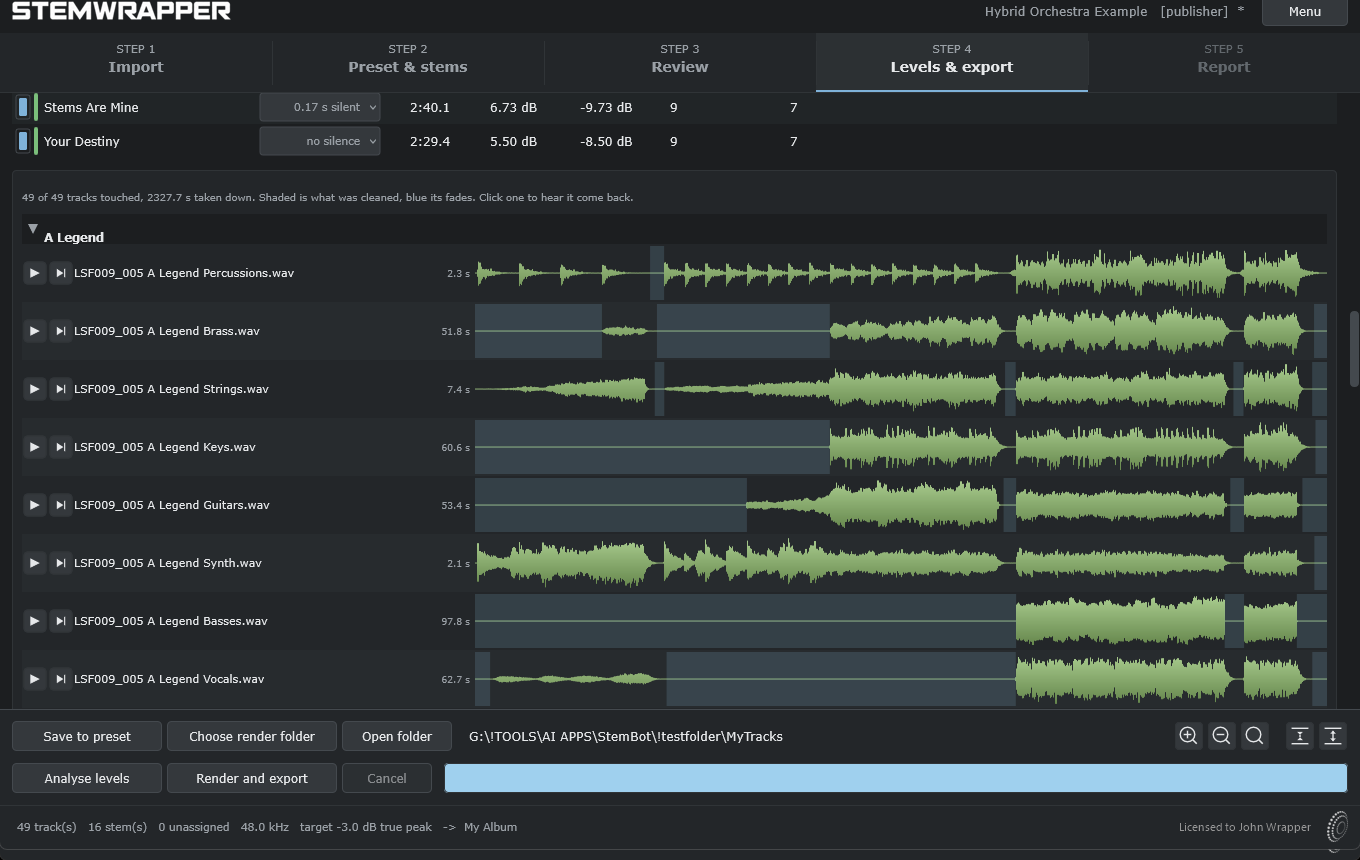
Optional cleanup, applied to each source track before summing.
A track exported from a DAW usually runs for the full cue, even when its instrument is not playing. Those inactive sections are rarely completely silent: room tone, reverb tails, or recording hiss can remain. On one track, that noise may be inaudible. Across forty tracks summed into a stem, it can build up.
Turn cleanup on and StemWrapper attenuates those sections before summing, with fades placed within the inactive section so they do not cut into the decay leading up to it. Cleanup is applied to source tracks, never to a finished stem, so the stems still add up to the mix and the reconstruction check still passes.
You can verify the result yourself. Every source track is shown as a waveform with the attenuated sections shaded, and you can audition exactly how each track will sound after cleanup. This lets you confirm that reverb tails and decays are preserved before exporting a single file.
It shows you what you are sending
The final step: review the delivery before anyone else does.
Every exported file is listed with its level, format, length, and size. You can audition any file on the spot with its spectrogram and waveform, so nothing goes out unheard. The list can be copied straight into an email to the publisher, or saved as a page or plain-text report to include with the delivery.
StemWrapper also recombines the stems and compares them with the delivered mix. The residual is reported in decibels, so you can verify that the stems add up correctly before the publisher does.
One cue or forty
Each cue gets its own folder, report, and reconstruction check. If you want a consistent level across an entire record, you can apply one gain setting to the whole set.
Alternative mixes
Create versions with selected stems omitted: no vocals, percussion only, or whatever the brief requires. Each is exported alongside the full mix and follows the same naming convention.
A preset per project
Save the stem list, optional keywords, and naming convention as a reusable preset: one for a publisher, one for a composer you work with, or one for an album that needs its own setup.
Sound design cues
It works just as well with an orchestral session neatly organised into instrumental groups as with a cue that has no grouping at all, or one whose groups need to be rearranged to match the delivery specification.
Requirements and specifications
| Windows | Windows 10 or later, 64-bit |
|---|---|
| macOS | macOS 11 Big Sur or later, Apple Silicon and Intel |
| Supported formats | WAV, AIFF, FLAC, up to 32-bit float and 192 kHz |
| Licence agreement | EULA PDF |
Try it first
Thirty days, with no feature limitations.
This is not a restricted demo: you get real exports, full quality, no length limit, and every feature. Use the full thirty days to test it on real jobs with your own tracks and your own delivery specifications.
Version 0.97.2 beta, for Windows and macOS.